
See what depends on a flow before you edit it
Every flow tells you what depends on it — channels and prompt flows both — which is the only reason sharing a flow between six numbers is safe.
Sharing a flow is only safe because you can see what shares it. The Used-by panel on every flow lists the channels that route to it and the prompt flows that hand over to it, each labelled with how it is used.
The habit worth building is reading it before you edit, not just before you delete. Deletion is the obvious risk; a quiet edit to a flow behind six numbers is the frequent one.
Before you start
- A flow you are about to edit.
- A number you can ring afterwards to confirm nothing you did not intend to change has changed.
Steps
Open the flow and read the Used-by panel
It names channels and prompt flows, with the relationship stated — "Route incoming", "Handover".
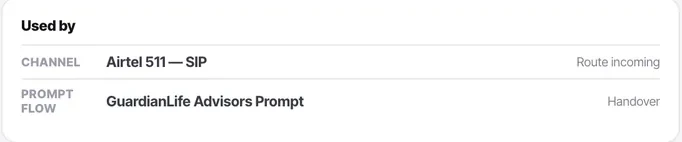
Read it before every edit
Not just before deleting. An edit to a shared flow changes every number behind it at once, silently.
Expect shared flows to have long lists
That is the design working. An after-hours flow used by six numbers should say so.
Copy rather than edit when one caller needs different treatment
If a change would help one number and hurt another, make a second flow. That is far cheaper than a subtle 3am bug on a line you rarely test.
Check the list again afterwards
Then ring one of the numbers you did not intend to affect, and confirm nothing changed.
Check it worked
Pick your most-used flow and read its dependency list. If anything on it surprises you, that is the information you needed before the next edit.
The parts people get wrong
- Bots and knowledge bases carry the same kind of list. The pattern is consistent across everything reusable in the product.
- Unpublishing a flow that other flows nest breaks those flows too. The dependency list is where you find out in advance.
The ones people actually ask
Why does my shared flow have such a long Used-by list?
That is the design working. An after-hours flow used by six numbers should say so — the list is what tells you an edit here changes every one of them at once, silently.
One number needs different treatment.
Copy rather than edit. If a change would help one number and hurt another, make a second flow — far cheaper than a subtle 3am bug on a line you rarely test.
I edited a shared flow. What should I check?
Ring one of the numbers you did not intend to affect and confirm nothing changed. Reading the list before is half the job; confirming afterwards is the other half.