
Build an after-hours flow behind several numbers
A worked example, end to end. The calls you miss between 7pm and 9am have a floor of zero, which makes them the safest place to start with AI.
This is the deployment to do first, and the reasoning is entirely about risk. Right now, nobody answers your phone at 8pm. Whatever an AI agent does is being compared against a ringing tone, so the downside is close to zero and the upside is every enquiry you currently lose overnight.
By contrast, putting an AI agent on your main daytime line is compared against your best salesperson. Same technology, completely different risk.
This tutorial builds one shared flow, nested from every number you own, so a change to your out-of-hours handling is a single edit.
Before you start
- Calling hours and timezone set correctly on every channel involved.
- A tested call bot with handover conditions and its own call timings.
- A connected calendar, if you want it to book.
- A decision about who picks up what it collects, and when.
Steps
Set hours on every channel first
The flow reads them. Different numbers can have different hours and the same shared flow still works, because it asks the channel rather than storing its own.
Create one flow called "After hours"
One flow, shared. Not one per number — that is the mistake this whole approach exists to avoid.
Set Runs on to incoming call
This flow handles calls arriving, not an autodialler.
Runs on is what makes a flow eligible in the first place, which is why a flow built for inbound will not appear when you configure a campaign. If a flow is missing from a picker, check this field before anything else.

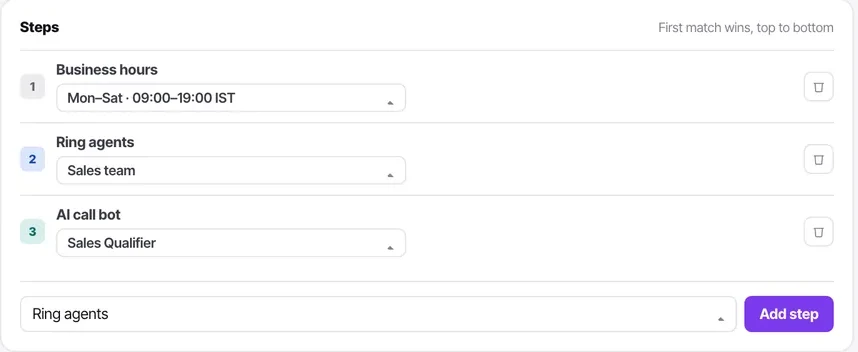
Start with a business hours step
Open on one branch, closed on the other. Everything below depends on this answer.
On the open branch, ring agents then fall through
Twenty to thirty seconds, then hand to the AI agent. Missed calls during working hours are a leak too — this branch is not just filler.
On the closed branch, hand straight to the AI agent
No ringing an empty office first. Answering on the first ring is most of the value, and a caller at 9pm who hears thirty seconds of ringing has already decided you are shut.
Give the agent a deliberately narrow out-of-hours job
Take the enquiry, answer what it can from the knowledge base, book a slot if the calendar allows, promise a callback otherwise. Do not let it attempt your full sales process at midnight with nobody to escalate to.
End the closed branch with voicemail as a fallback
For when the agent hands over and no human exists to receive it. Something must catch the call.
Publish it, then nest it from each number's own flow
Each channel points at its own flow, which nests this one. Change the shared flow once and every number follows.
Test at 9am, at 7pm and on a Sunday
Temporarily change the hours if you have to. Three calls, and you will have found any timezone error before a customer does.
Check it worked
After a week, look at two things: how many calls the agent handled outside hours, and what happened to the enquiries it collected. The first number tells you what you were losing. The second tells you whether anybody is acting on it — and if the answer is no, the flow is working and your process is not.
The parts people get wrong
- Start here rather than with your main daytime line. Nobody is currently answering these calls, so the comparison is against zero.
- Check the dependency list before editing the shared flow — by design it will be behind every number you own.
- A workflow that creates a task from an out-of-hours enquiry turns a message into somebody's morning job.
The ones people actually ask
Should I build one flow per number?
No — that is the mistake this whole approach exists to avoid. Build one flow called After hours and nest it from each number's own flow. Change the shared flow once and every number follows.
Different numbers have different hours. Does one shared flow still work?
Yes. The business hours step asks the channel rather than storing its own hours, so the same shared flow behaves correctly behind numbers with completely different opening times.
Should the closed branch ring the office first?
No. Answer on the first ring — a caller at 9pm who hears thirty seconds of ringing has already decided you are shut. Hand straight to the AI agent, and end the branch with voicemail as a fallback for when it hands over and no human exists to receive it.
What job should the out-of-hours agent have?
A deliberately narrow one: take the enquiry, answer what it can from the knowledge base, book a slot if the calendar allows, promise a callback otherwise. Do not let it attempt your full sales process at midnight with nobody to escalate to.