
Invite your team and assign roles
Add the people, give each the narrowest role that lets them work, and tell them what will look broken on their first login.
Inviting people is mechanical. The two things worth doing carefully are choosing roles deliberately rather than reactively, and warning people what their first login will look like.
That second one is not a nicety. A new agent signs in to an empty Inbox, because nothing is assigned to them yet, and a rail with no Workflows item. Both are correct. Without a word of warning, a good proportion of people conclude their account is broken and go and ask somebody.
Before you start
- Admin access — user management is admin-only.
- Work email addresses for everyone you are adding.
- A free seat per person: 1 user on Starter, 3 on Growth, 10 on Scale, 20 on Enterprise.
Steps
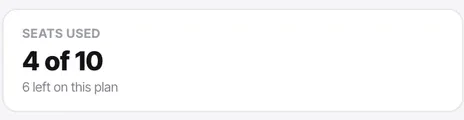
Check the seat meter before you start
Your plan sets a hard ceiling. The entitlement meter in Billing reads "used N of M", so you find out you are near the limit before an invite fails halfway through.
Starter is a single user, which is worth knowing before you plan a team rollout on it.
Invite everyone in one sitting
Adding people one at a time as they ask is how teams end up with everybody on manager — each individual request seems reasonable and nobody is comparing them.
Have the list of addresses ready and do it in one pass, deciding roles as a set.
Assign the role at invite time, defaulting to agent
Promote to manager only for the people who run the operation — routing, hours, bots, flows, campaigns. Promote to admin only for those who should be able to spend money and enter credentials.
Make sure at least two people end up as admin.
Use the address they read
Assignment notifications, mentions and reminders go there. Someone invited on an address they check monthly will look unresponsive rather than un-notified.
Tell people what their first login looks like
Send one short message with the invite. Three lines is enough:
- Your Inbox will be empty until something is assigned to you. That is normal.
- You will not see Workflows. Only managers and admins do.
- You can only see conversations assigned to you, so the queue is not hidden — it is not yours yet.
Have them turn on notifications straight away
Especially on mobile. An agent whose work arrives by assignment and who has no notifications has to poll the Inbox to find out they have work, which nobody does reliably.
Check it worked
Sign in as a test agent if you can, or ask one of your new agents to share their screen for thirty seconds. Confirm they see an empty Inbox, no Workflows item, and no assignee filter. All three are correct — you are checking that they have not been given more than they need.
The parts people get wrong
- Deactivating is not deleting. Deactivate when somebody leaves so their history stays readable on activity feeds; deleting makes past conversations harder to interpret.
- Reassign a departing person's open conversations and tasks before deactivating them, and check whether they own any workflows or are the WhatsApp channel message user. Both go quiet otherwise.
- One seat is one person. A shared login makes assignment meaningless, and assignment is what decides who sees what.
The ones people actually ask
A teammate never received their invite.
Check the address for a typo first, then spam. If it is a company mailbox, the invite may be held by a mail filter — ask whoever runs your mail to allow the sender. You can safely re-send an invite; it does not consume an extra seat.
Can I change somebody's role after they have joined?
Yes, from user management, and it takes effect immediately. Bear in mind that a demotion is much more noticeable than never having been promoted, which is the argument for defaulting everybody to agent and promoting on request rather than in anticipation.
I have run out of seats. What are my options?
Two: deactivate people who have left, which frees their seat, or move up a plan. Seats are 1 on Starter, 3 on Growth, 10 on Scale and 20 on Enterprise. If you are deactivating somebody, reassign their open conversations and tasks first and check whether they own any workflows.
Can two people share one login?
Technically yes, and it breaks the product. Assignment is what decides who sees what, so a shared login makes every queue, every notification and every audit entry meaningless. One seat is one person.